
How to Use CPT, ICD-10-CM, and HCPCS eBooks During the AAPC CPC Exam
Preparing for the CPC exam is one thing—knowing how to efficiently navigate your coding manuals during the exam is what truly determines your success. If you’re using eBooks instead of physical manuals, your strategy needs to be even sharper.
Understanding the CPC Exam Format
The AAPC CPC exam is timed (100 questions, 4 hours) and open-book, meaning you are allowed to use:
-
CPT
-
ICD-10-CM
-
HCPCS Level II
When using eBooks, speed and navigation skills become critical because you won’t have physical tabs or handwritten notes to rely on.
Choosing the Correct AAPC CPC Exam Format for You FAQs
Key Differences: eBooks vs. Physical Books
Before diving into strategy, understand what changes with eBooks:
Advantages:
-
Search (Ctrl + F / Find feature)
-
No page flipping
-
Clean, searchable text
Challenges:
-
Limited or no annotations (depending on platform)
-
Slower navigation if you don’t know the exact terms
-
Cannot “tab” sections like physical books
Manuals vs Ebooks for AAPC CPC exam
Master the Search Function (Your #1 Tool)
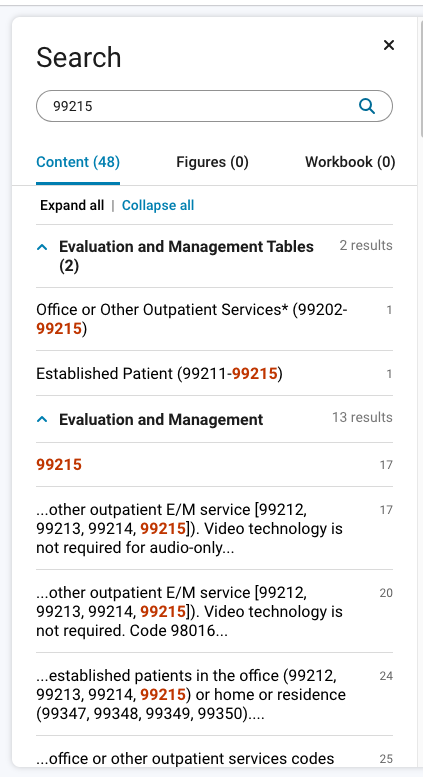
Your most powerful tool in an eBook is the search function.
Best Practices:
-
Search key terms, not full questions
Example: Instead of searching “laparoscopic appendectomy with rupture”
→ search “appendectomy laparoscopic.” -
Use medical root words
→ “cholecyst” instead of “gallbladder removal.” -
Avoid common words like:
-
with
-
without
-
procedure
-
Pro Tip:
Search the main term first, just like you would in the Alphabetic Index.
Start with ICD-10-CM (When Diagnosis is Required)
Many CPC questions require diagnosis coding first.
Steps:
-
Identify the condition
-
Search the main term in the ICD-10-CM eBook
-
Review subterms
-
Verify in the Tabular List
Important:
-
Always confirm laterality (left, right, bilateral)
-
Check for:
-
“Code first”
-
“Use additional code.”
-
Excludes1 vs Excludes2 notes
-
Medical Coding ICD-10-CM Excludes 1
Medical Coding ICD-10-CM Excludes 2
CPT Coding Strategy in eBooks
CPT is where most students lose time.
Efficient Workflow:
-
Identify the procedure type
-
Search the main procedure term
-
Narrow by:
-
Approach (open, laparoscopic)
-
Site
-
Extent of service
-
Use the Table of Contents (TOC):
-
Surgery section (10000–69990)
-
Medicine section (90281–99607)
-
Radiology, Path/Lab, etc.
Pro Tip:
If search results are overwhelming:
-
Go directly to the code range
-
Then scroll within that section
HCPCS Level II Tips
HCPCS questions are often quicker—but only if you know what to look for.
Common Categories:
-
J-codes (drugs)
-
E-codes (DME)
-
A-codes (supplies)
Search Tips:
-
Use drug names (generic preferred)
-
Search by equipment type (e.g., “wheelchair”)
Time Management Strategy
You have 2.4 minutes per question—you cannot over-search.
Recommended Approach:
-
Answer what you know immediately
-
Mark difficult questions
-
Return later if time allows
Avoid:
-
Overusing the search for simple questions
-
Getting stuck on one question
Practice Before Exam Day
Do not wait until exam day to learn eBook navigation.
You should practice:
-
Searching terms quickly
-
Switching between manuals
-
Locating code ranges without hesitation
Common Mistakes to Avoid
-
Searching for full sentences instead of keywords
-
Skipping Tabular/List verification
-
Ignoring coding guidelines and notes
-
Spending too long on one question
-
Not recognizing synonyms (e.g., “excision” vs “removal”)
Final Exam Strategy
Think of your eBooks as tools—not crutches.
-
You should confirm answers, not rely on searching everything
-
Strong foundational knowledge = faster navigation
-
Confidence comes from repetition and familiarity
Bottom Line
Using CPT, ICD-10-CM, and HCPCS eBooks during the CPC exam is absolutely effective—but only if you know how to use them strategically.
Success comes down to:
-
Knowing what to search
-
Knowing where to look
-
Knowing when to move on